Home Organization App for the Stuff You Put Away and Forget
A home organization app should help with the stuff you put away and forget. Learn how to choose the right app for hidden storage.
By Ben Stallsworth · Co-Founder, Totely
September 4, 2026 · Updated September 4, 2026 · 19 min read
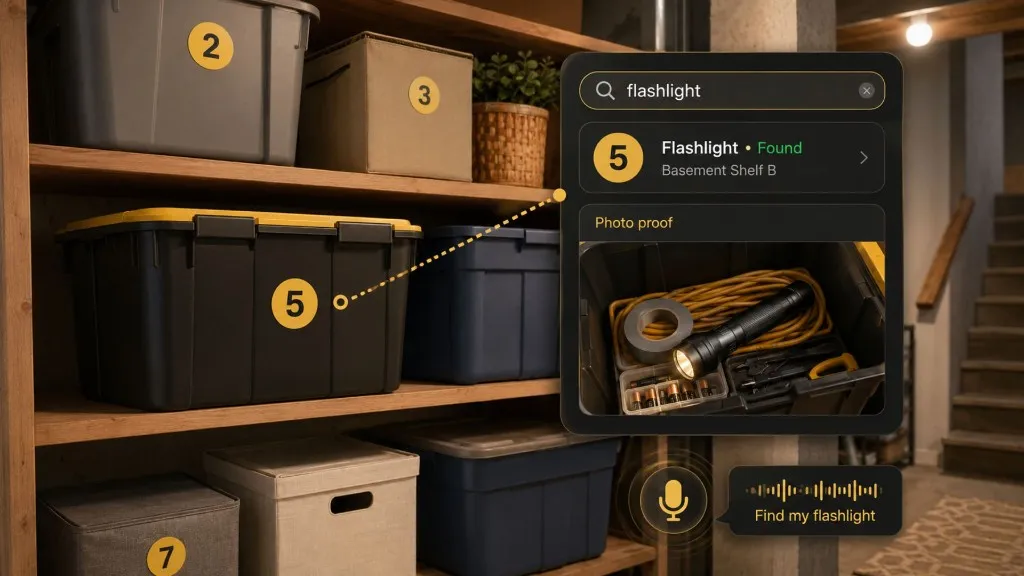
A home organization app can mean almost anything.
It might be a calendar.
It might be a chore tracker.
It might be a grocery list.
It might be a family command center.
It might be a notes app, cleaning app, home maintenance app, document vault, moving checklist, or inventory system.
That is the problem.
When you search for a home organization app, the results often answer a different question than the one you actually have.
Maybe you do not need another calendar.
Maybe you do not need a cleaning routine.
Maybe you do not need a shared grocery list.
Maybe the real problem is simpler:
You put something away, and now you cannot remember where it is.
The winter gloves.
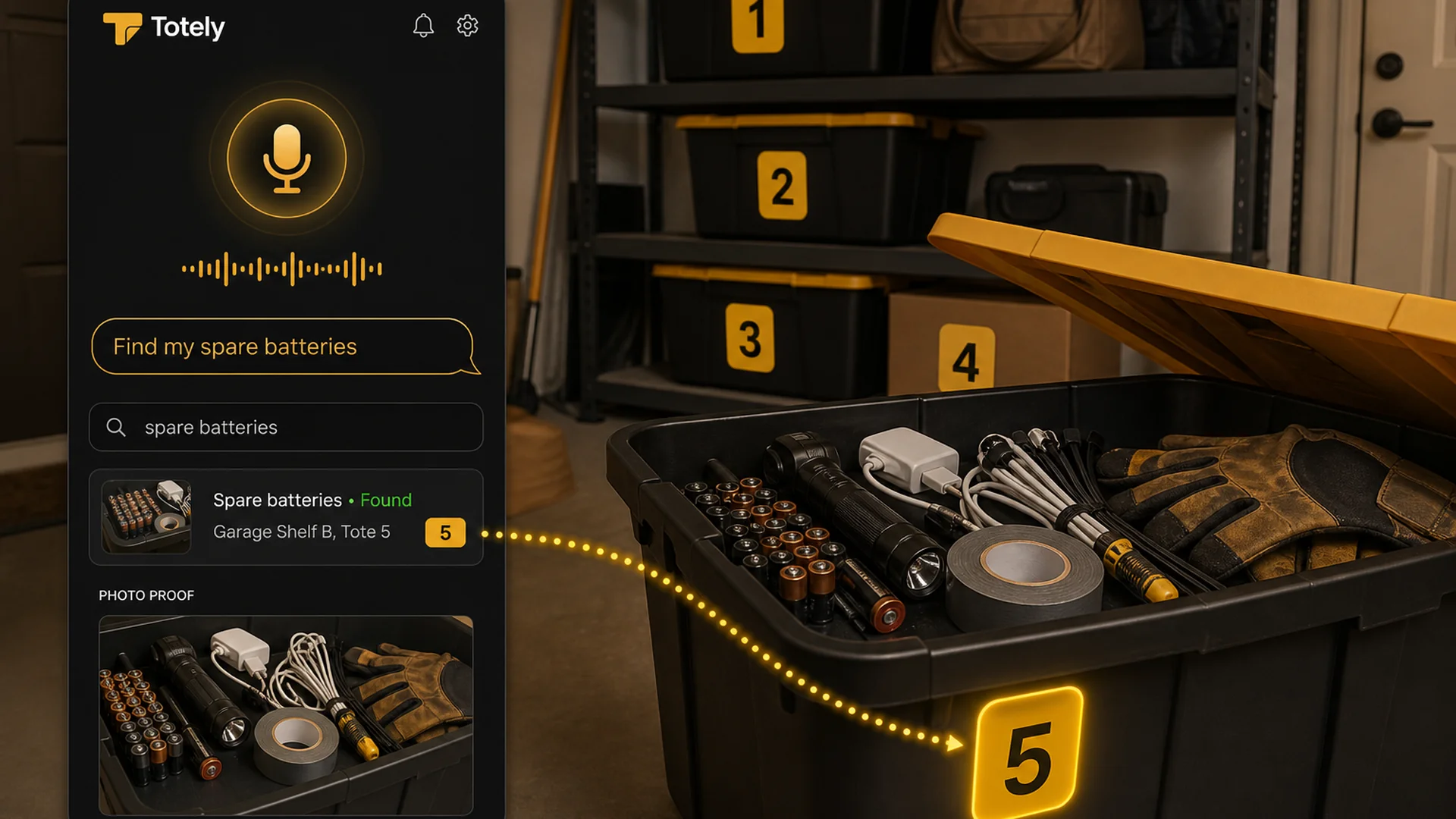
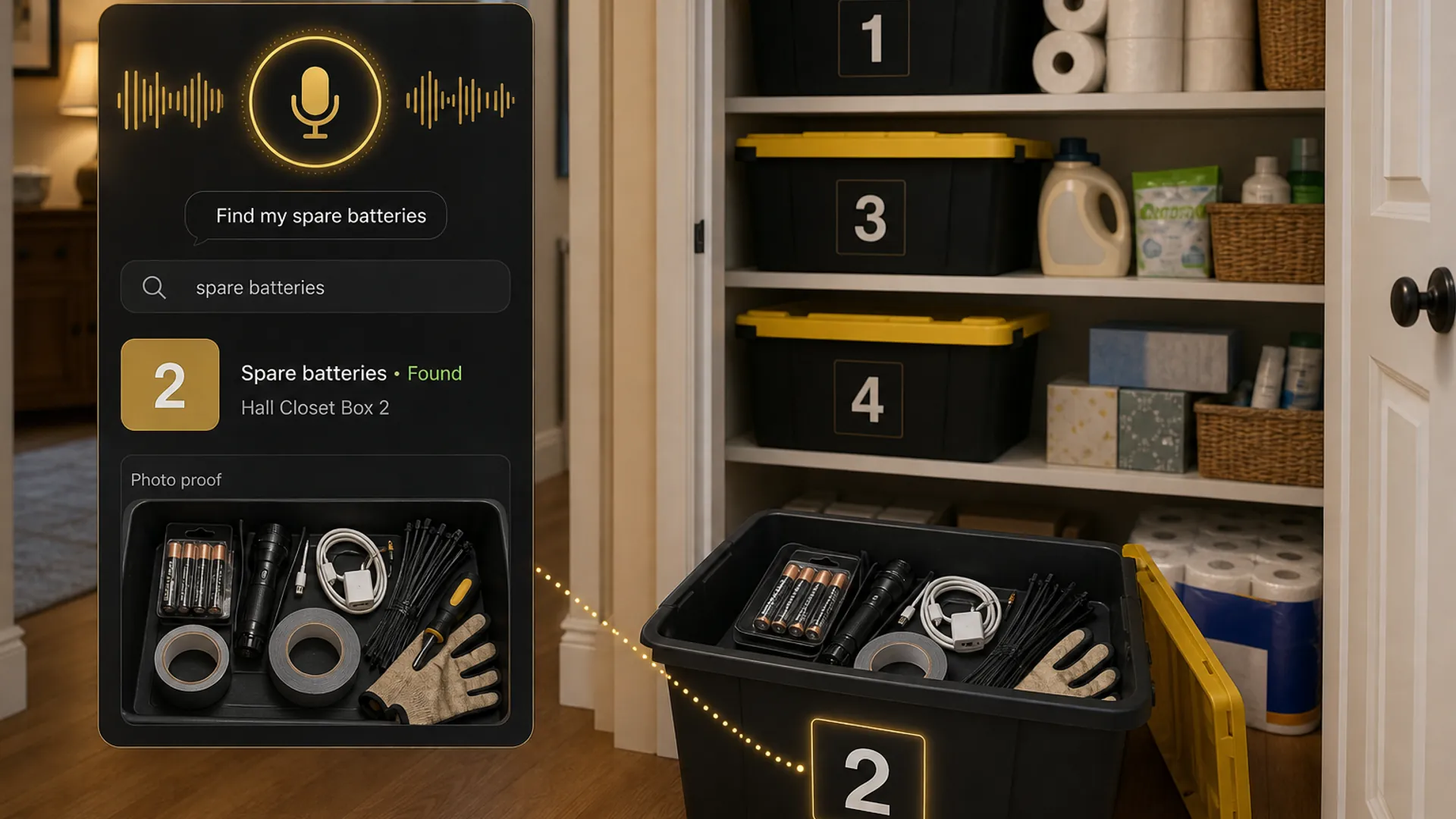
The spare batteries.
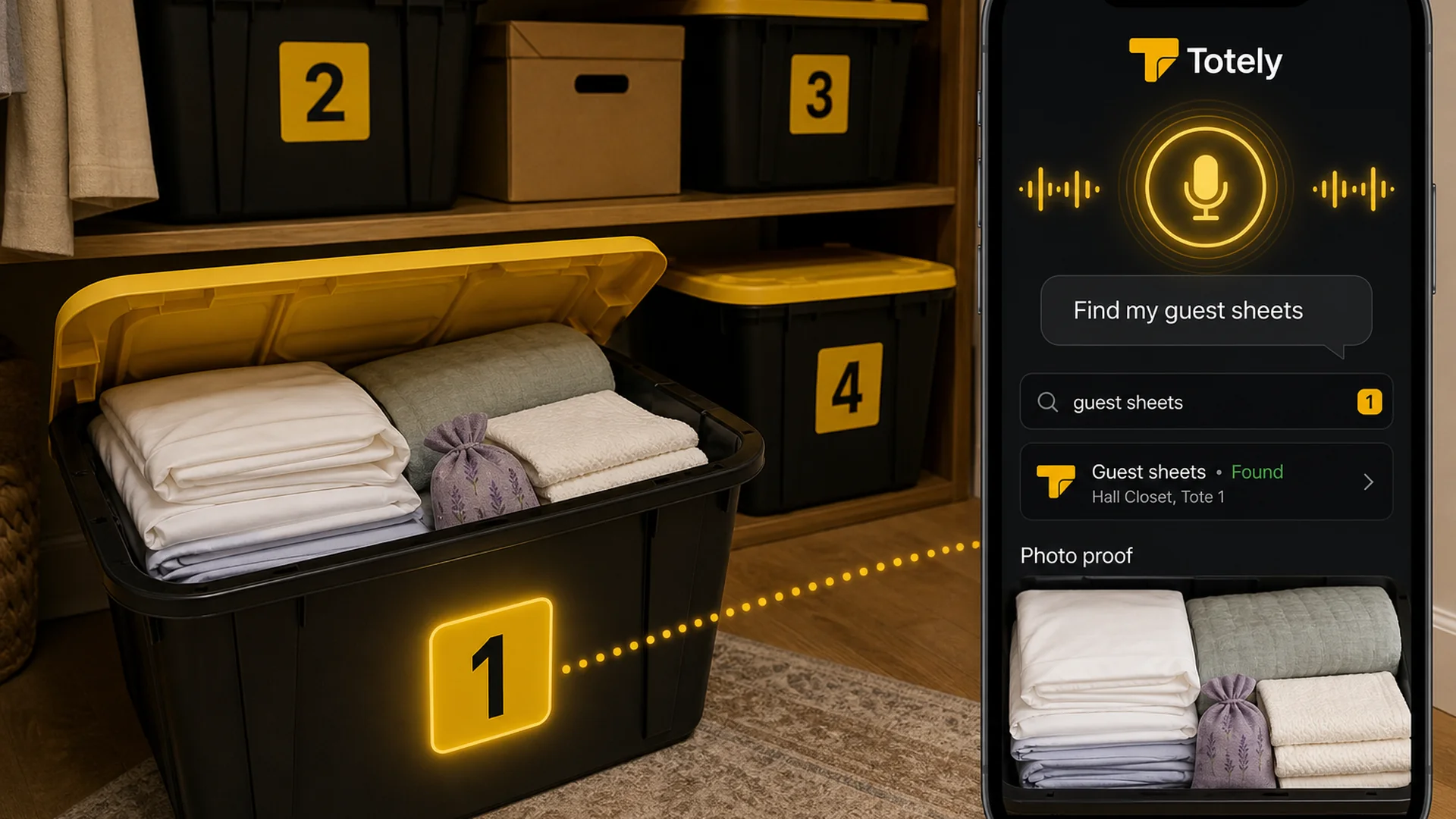
The guest sheets.
The holiday lights.
The camera lens.
The label rolls.
The extension cord.
The thing is not gone.
It is stored.
A good home organization app should help with that too.
Quick Links
- What Does a Home Organization App Actually Mean?
- The Main Types of Home Organization Apps
- The Missing Category: Physical Storage Memory
- What Makes Stored Items So Hard to Find?
- What to Look For in a Storage-Memory App
- What You Probably Do Not Need at First
- How to Start With One Tote
- How Totely Fits This Category
- Home Organization App FAQ
What Does a Home Organization App Actually Mean?
A home organization app is any digital tool that helps you manage part of your household.
But that is a huge category.
Different people mean different things when they search for one.
One person wants a family calendar.
Another wants a cleaning schedule.
Another wants help with grocery lists.
Another wants to store appliance manuals.
Another wants to know what is inside the garage bins.
Those are not the same problem.
A calendar app will not tell you which tote has the winter gloves.
A cleaning app will not remember where the guest sheets are.
A grocery list will not show you what is inside the storage unit.
A document app will not help you find the camping lantern unless you built a system around it.
So the first question is not:
What is the best home organization app?
The better question is:
What part of home life am I trying to organize?
The Main Types of Home Organization Apps
Most home organization apps fall into a few clear categories.
1. Calendar and Reminder Apps
These help you remember when something needs to happen.
Good for:
- appointments
- school events
- family schedules
- home maintenance reminders
- recurring tasks
- seasonal reminders
- bill due dates
- filter changes
- yard work
- annual checkups
Examples of jobs they solve:
- “Remind me to change the air filter.”
- “Keep soccer practice and dentist appointments in one place.”
- “Tell me when the water filter needs replacing.”
- “Remind us when trash day changes.”
These apps organize time.
They do not organize stored stuff.
2. Chore and Cleaning Apps
These help you keep up with household routines.
Good for:
- cleaning schedules
- room-by-room chores
- recurring cleaning tasks
- family chore assignments
- gamified housework
- reminders for less frequent jobs
- keeping cleaning from feeling random
Examples of jobs they solve:
- “What should I clean today?”
- “Who is responsible for the bathroom?”
- “When did we last mop the kitchen?”
- “What needs attention this week?”
These apps organize routines.
They do not usually remember what is inside the box on the garage shelf.
3. Grocery and Meal Planning Apps
These help with food-related household organization.
Good for:
- grocery lists
- shared shopping
- meal plans
- recipes
- pantry lists
- freezer tracking
- store-specific lists
- family meal coordination
Examples of jobs they solve:
- “Add milk to the list.”
- “What are we making this week?”
- “Do we have ingredients for dinner?”
- “Can everyone add to the same grocery list?”
These apps organize food planning.
They do not organize the holiday tote.
4. Household Coordination Apps
These try to become a family command center.
Good for:
- shared calendars
- to-do lists
- shopping lists
- reminders
- notes
- family schedules
- basic household planning
Examples of jobs they solve:
- “Can everyone see the same calendar?”
- “Where is the shared shopping list?”
- “What does the household need this week?”
- “Who is doing what?”
These apps organize communication.
They can be useful, but they often become too broad.
5. Home Records and Document Apps
These help track important information about the home.
Good for:
- appliance manuals
- paint colors
- contractor contacts
- warranties
- receipts
- home maintenance records
- renovation documents
- insurance paperwork
- service history
Examples of jobs they solve:
- “What size filter does the furnace need?”
- “Where is the washer warranty?”
- “What paint color did we use in the bedroom?”
- “Who installed the water heater?”
These apps organize home information.
They are helpful for records, but not always built for finding stored items fast.
6. Home Inventory Apps
These help track belongings.
Good for:
- insurance documentation
- valuable items
- collections
- moving
- storage units
- tools
- electronics
- furniture
- receipts
- serial numbers
- estimated values
Examples of jobs they solve:
- “What would I need to list for insurance?”
- “What electronics do we own?”
- “Where is the camera lens?”
- “Which moving box has the coffee maker?”
These apps organize belongings.
But some are too detailed for everyday storage.
7. Searchable Storage Apps
This is the category many people actually need.
Good for:
- totes
- boxes
- bins
- shelves
- drawers
- closets
- garages
- attics
- basements
- under-bed storage
- moving boxes
- storage units
- hidden storage spots
Examples of jobs they solve:
- “Find my winter gloves.”
- “Which tote has the holiday lights?”
- “Where are the guest sheets?”
- “Do we already have spare batteries?”
- “What is in the box on Garage Shelf A?”
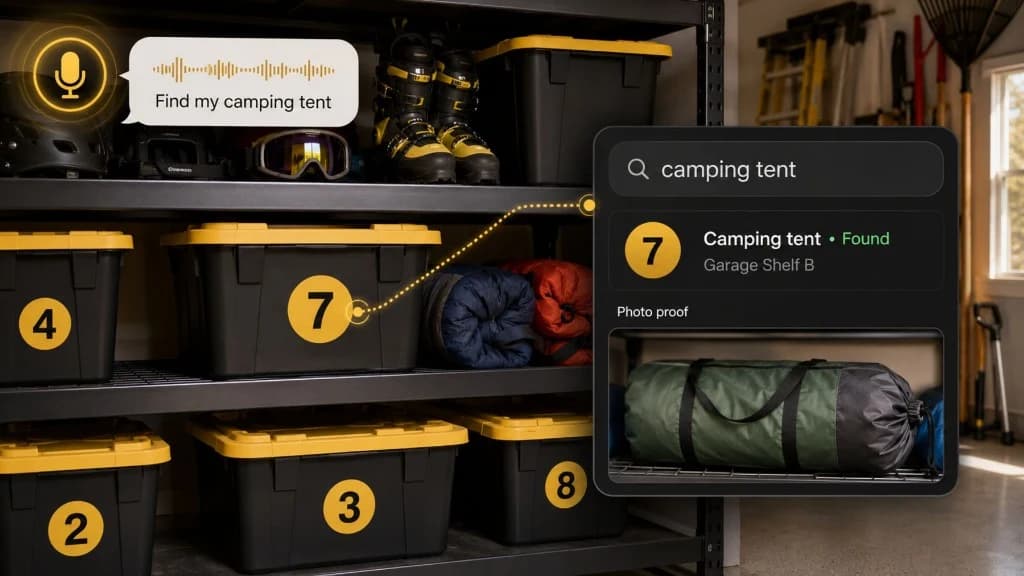
- “Which storage unit box has the camping lantern?”
These apps organize physical storage memory.
That is different from chores, calendars, groceries, and general productivity.
The Missing Category: Physical Storage Memory
The most useful home organization app is not always the one with the longest feature list.
Sometimes the best app is the one that solves the problem you actually feel every week.
For many homes, that problem is hidden storage.
Things disappear into:
- a safe place
- a closet
- a tote
- a garage shelf
- a drawer
- a moving box
- an attic bin
- a storage unit
- a basement rack
- an under-bed container
At the time, the location makes perfect sense.
Three months later, it does not.
That is not a personal failure.
That is how physical storage works.
The moment an item leaves daily view, your memory becomes the system.
And memory is not a great storage system.
A physical storage memory app gives stored items a digital layer.
The tote stays simple.
The app remembers the details.
What Makes Stored Items So Hard to Find?
Stored items are hard to find because they are usually hidden inside something else.
A calendar can show you a date.
A grocery app can show you a list.
A cleaning app can show you a task.
But a stored item might be inside:
- a tote inside a closet
- a box behind another box
- a bin on a shelf
- a drawer under a bed
- a bag in a storage unit
- a holiday container in the garage
- a moving box that never got unpacked
That creates three problems.
1. The Outside Does Not Show the Inside
A plastic bin looks like every other plastic bin.
A cardboard box looks like every other cardboard box.
A label may help, but labels get vague.
Common labels include:
- holiday
- misc
- office
- garage
- winter
- kids
- guest room
- storage
- keepsakes
Those labels are not wrong.
They are just not specific enough.
If you need hand warmers, a label that says winter might still mean opening three boxes.
2. Contents Change
Even if the label was accurate once, contents change.
You add something.
You remove something.
You combine two boxes.
You move one tote to another shelf.
You put something “just for now” into the nearest bin.
The outside label stays the same.
The inside reality changes.
That is why a home organization app for storage needs to be easy to update.
3. Locations Are Too Vague
“Garage” is not a location.
“Closet” is not a location.
“Storage unit” is not a location.
Useful locations sound more like:
- Garage Shelf A, Tote 3
- Hall Closet, Top Shelf, Bin 2
- Under Bed, Left Side, Bag 1
- Storage Unit, Front Right, Box 6
- Basement Rack B, Bottom Shelf
- Office Cabinet, Supply Box 4
The more exact the location, the less digging later.
What to Look For in a Storage-Memory App
A good home organization app for stored items should not make your life more complicated.
It should make the hidden stuff easier to find.
Look for these features.
1. Photos
Photos are the fastest way to start.
A photo can show:
- what is inside the tote
- whether the item is actually there
- what else is packed with it
- whether the container is worth opening
- whether the contents changed
A good app should let you take photos of:
- individual items
- open totes
- open boxes
- shelves
- drawers
- storage zones
- receipts or manuals if needed
Photo proof matters because it saves you from opening the wrong container.
2. Search
Search is the reason digital storage beats memory.
You should be able to search for:
- winter gloves
- spare batteries
- holiday lights
- guest sheets
- camping lantern
- camera lens
- printer ink
- label rolls
- extension cord
- bike pump
The app should not require you to remember the perfect category.
You should not have to know whether the gloves were filed under winter, garage, kids, clothing, or seasonal.
You should search the words you naturally use.
3. Exact Locations
The app should let you save locations that match real life.
Examples:
- Garage Shelf A
- Hall Closet
- Basement Rack B
- Attic Shelf
- Under Bed Left
- Storage Unit Front Right
- Office Cabinet
- Guest Room Closet
Even better, it should connect the location to the container.
Example:
Garage Shelf A, Tote 3
That is useful.
4. Containers
A storage-memory app should understand containers.
That means:
- box
- tote
- bin
- shelf
- drawer
- bag
- suitcase
- moving box
- storage zone
Most stored items are not sitting loose on a surface.
They are inside something.
If the app does not handle containers well, it will not work well for home storage.
5. Low-Friction Setup
If setup takes too long, the system will not last.
A good starter workflow should be simple:
- Number the container.
- Take a photo.
- Add the key items.
- Save the location.
- Search later.
That is enough to start.
You can add more detail later if it matters.
6. Sharing
A home system is more useful when other people can use it.
Sharing matters if:
- one person usually knows where everything is
- a partner needs to find things
- kids need seasonal gear
- roommates share storage
- a family is moving
- someone else needs access to household records
The goal is to move storage memory out of one person’s head.
7. Backup or Export
Your storage memory should not live in one fragile place.
Useful backup options include:
- cloud sync
- PDF export
- CSV export
- spreadsheet backup
- shared access
- printable report
- account recovery
- offline access if needed
You do not need every option on day one.
But you should know where your data lives.
What You Probably Do Not Need at First
A lot of organization apps feel powerful because they have more features.
More features do not always mean a better household system.
For stored items, you probably do not need all of this on day one:
- complicated category trees
- every item in the house
- serial numbers for ordinary items
- values for every container
- QR codes before you know the system works
- barcode scanning for things without useful barcodes
- advanced reports
- dashboards
- automations
- business inventory workflows
- team permissions
- purchase orders
- stock counts
- reorder rules
Those can be useful later.
But they are not the first win.
The first win is finding the thing.
How to Start With One Tote
Do not start with the whole house.
Start with one tote, one box, one shelf, or one closet.
Pick a container that already annoys you.
Good starters include:
- winter gear tote
- holiday lights bin
- guest linens box
- office supply box
- battery and flashlight drawer
- camping gear tote
- under-bed seasonal bin
- moving box that never got unpacked
- storage unit box near the front
Use this simple workflow.
Step 1: Give the Container a Number
Use a large, visible number.
Example:
3
Do not write the whole contents list outside.
The outside should be easy to see.
The details can live in the app.
Step 2: Take a Photo
Open the tote and take one clear photo.
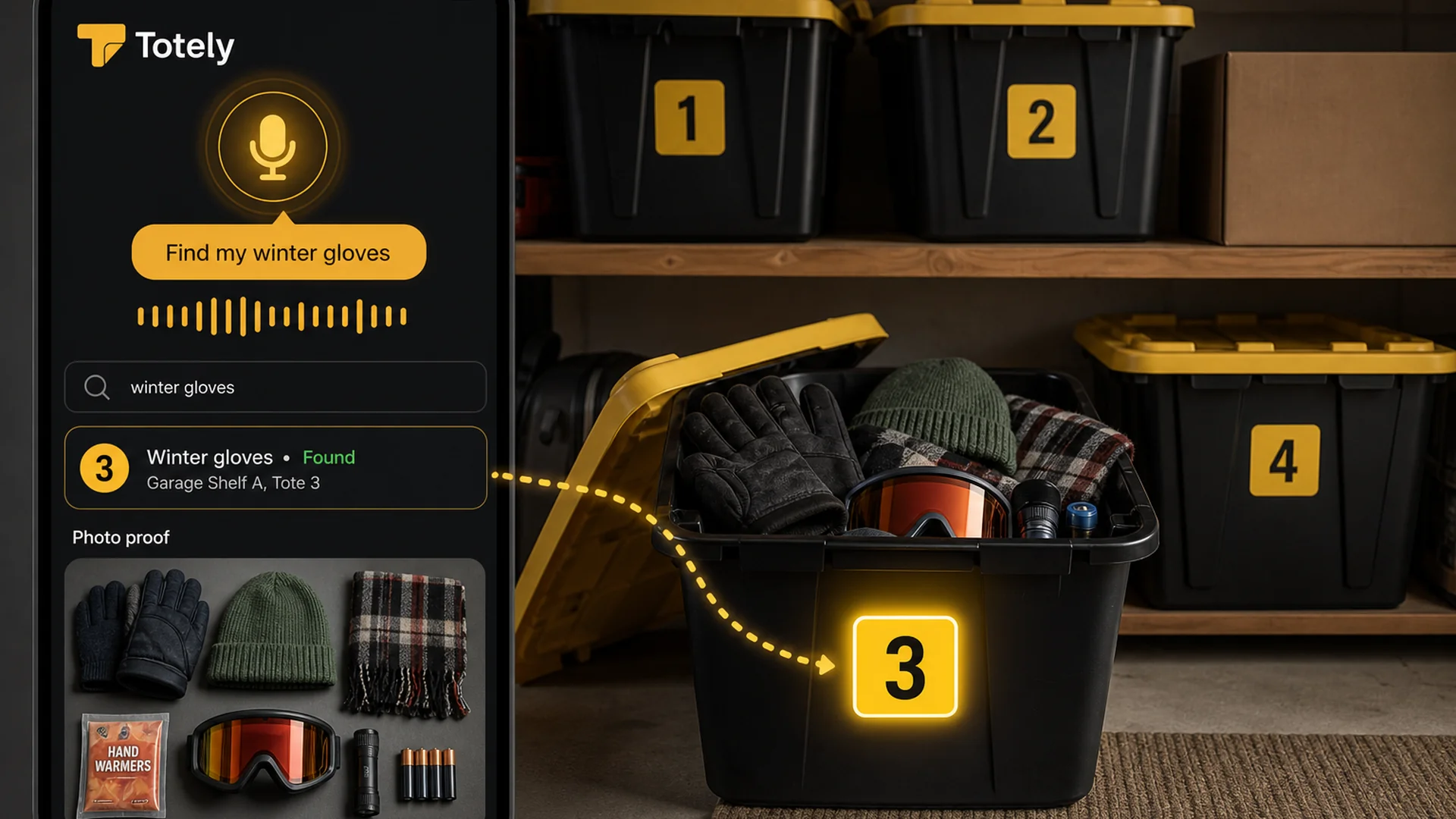
For a winter gear tote, the photo might show:
- winter gloves
- knit hat
- scarf
- hand warmers
- snow goggles
- small flashlight
- spare batteries
If there are layers, take more than one photo.
Step 3: Add Searchable Item Names
Add the words you would actually search later.
Example:
winter gloves, knit hat, scarf, hand warmers, snow goggles
Do not write every tiny item.
Do not over-categorize.
Add what future you will search for.
Step 4: Save the Exact Location
Use plain language.
Example:
Garage Shelf A, Tote 3
That is better than:
Garage
Specific beats perfect.
Step 5: Search Before Opening
Later, search:
winter gloves
The app should tell you:
Garage Shelf A, Tote 3
If it does, the system works.
Then you can add the next tote.
How Totely Fits This Category
Totely is a home organization app for the stuff you put away and forget.
It is not trying to replace your calendar.
It is not a grocery app.
It is not a chore chart.
It is not a document vault.
It is not business warehouse software.
Totely is the digital memory layer for physical storage.
Use it for:
- totes
- boxes
- bins
- shelves
- drawers
- closets
- garages
- attics
- basements
- under-bed storage
- storage units
- moving boxes
- hidden storage spots
The physical system stays simple:
simple visible number outside
The digital record becomes specific:
photo proof, saved location, natural search
Here is the Totely workflow:
- Number the tote, box, bin, shelf, drawer, or storage zone.
- Snap a photo before closing or storing it.
- Let AI build the first item list from what it can see.
- Review or edit the record if needed.
- Save the exact location.
- Add notes for fragile, seasonal, sentimental, access, replacement, restock, or safety context.
- Search naturally later.
- Use photo proof before opening everything.
Totely does not require QR codes, barcodes, or manual entry of every item to start.
You can begin with one tote.
That is the point.
Home Organization App Comparison
| App type | Best for | Weak spot |
|---|---|---|
| Calendar app | Dates, appointments, recurring reminders | Does not track where stored items live |
| Chore app | Cleaning routines and household tasks | Does not remember what is inside boxes |
| Grocery app | Shared shopping and meal planning | Only helps with food-related lists |
| Family command center | Shared schedules, lists, and household communication | Can become too broad |
| Notes app | Flexible lists and quick capture | Easy to become messy or vague |
| Document app | Receipts, files, manuals, warranties | Not built for finding hidden stored objects |
| Home inventory app | Insurance, valuables, collections, moving | Can become too detailed |
| Storage-memory app | Totes, boxes, shelves, closets, garages, storage units | Works best when you keep locations updated |
| Totely-style system | Hidden storage, photo proof, natural search, simple numbers | Not a replacement for calendars, chores, insurance policies, or professional guidance |
When a Regular App Is Better
Totely does not need to be the answer to every home organization problem.
Use a calendar when the problem is time.
Use a chore app when the problem is routine.
Use a grocery app when the problem is shopping.
Use a document app when the problem is paperwork.
Use a home inventory app when the problem is insurance documentation.
Use Totely when the problem is:
I know we own it, but I do not know where it is.
That clear boundary matters.
The best home organization system is usually a small stack of tools that each do one job well.
What to Track in a Storage-Memory App
Start with fields that help you find things.
For each container, track:
- container number
- photo
- key contents
- exact location
- access note
- updated date
Optional notes:
- fragile
- seasonal
- sentimental
- front access
- check before buying
- restock
- warranty inside
- receipt saved
- batteries removed
- do not stack
You do not need perfect data.
You need useful memory.
What Not to Track
Do not track every tiny thing unless it matters.
You probably do not need:
- every sock
- every ornament hook
- every old cable tie
- every paperclip
- every piece of ribbon
- every duplicate plastic bag
- every item in a junk drawer
Track the things you would actually search for, rebuy, need seasonally, or worry about losing.
That keeps the system light enough to maintain.
A Real Example
Container:
Tote 3
Location:
Garage Shelf A
Key contents:
- winter gloves
- knit hat
- scarf
- hand warmers
- snow goggles
- small flashlight
- spare batteries
Access note:
Seasonal / check before winter
Photo:
Open tote photo
Later, someone searches:
winter gloves
The result should say:
Garage Shelf A, Tote 3
with a photo showing the gloves.
That is a home organization app doing a very specific job.
Not organizing your whole life.
Just helping you find the thing.
Home Organization App FAQ
What is a home organization app?
A home organization app is a digital tool that helps organize part of household life, such as calendars, chores, grocery lists, documents, maintenance records, home inventory, or stored items.
What is the best home organization app?
The best home organization app depends on the problem you need to solve. Use a calendar for reminders, a chore app for cleaning routines, a grocery app for shopping, a document app for records, and a storage-memory app for hidden items in boxes, bins, shelves, closets, garages, or storage units.
Is there one app that organizes everything at home?
Some apps try to organize many parts of home life, but most households do better with a few simple tools that each solve a specific problem. One app for everything can become too complicated to maintain.
What kind of app helps me find things I put away?
Look for a home storage organization app or searchable storage system that supports photos, container numbers, exact locations, search, and photo proof.
Do I need QR codes for home organization?
No. QR codes can be useful, but they are not required to start. A simple visible number, photo record, saved location, and search can solve many household storage problems.
What should I organize first?
Start with one hidden storage area that causes frustration: a tote, box, shelf, closet, drawer, under-bed bin, garage shelf, or storage unit box. Do not start with the whole house.
Can a home organization app help with seasonal items?
Yes. Seasonal items are one of the best use cases because they are stored for months at a time. Track things like holiday lights, winter gloves, guest linens, camping gear, and seasonal clothing by container and location.
Can Totely replace my chore app or calendar?
No. Totely is not meant to replace a chore app, grocery list, or calendar. Totely is for searchable physical storage: the stuff you put away and need to find later.
Is Totely only for totes?
No. Totely can help with totes, boxes, bins, shelves, drawers, closets, garages, attics, basements, under-bed storage, storage units, moving boxes, and hidden storage spots.
How do I keep a home organization app updated?
Make updates when the storage changes. If you add, remove, or move something important, update the photo, item list, or location before you forget. Keep the system small enough that updating it feels easy.
The Best App Is the One That Solves the Right Problem
A home organization app should not become another thing to organize.
It should remove friction.
If the friction is schedules, use a calendar.
If the friction is cleaning, use a chore app.
If the friction is grocery planning, use a grocery list.
If the friction is home records, use a document or home maintenance app.
If the friction is hidden storage, use a storage-memory app.
That is where Totely fits.
The stuff you put away should not disappear just because it is inside a tote, box, drawer, closet, garage shelf, or storage unit.
Give it a simple number.
Take a photo.
Save the location.
Search before opening everything.
Simple outside.
Specific inside.
Stored, not lost.